
Never miss a court date. Never lose an hour. Never get client money wrong.
Practice management for Ghanaian law firms, each with a database of its own.
- Built in Ghana
- VAT, NHIL and GETFund computed correctly
- Client account reconciled daily
- Data Protection Act aware
Every firm loses the same three things
Diaries, timesheets and the client account fail quietly, and most firms only learn the size of it at the year end.
01Missed dates
Your diary lives with one person. When she is away, so is your calendar.
A deadline engine computes every date from the court rules and the public holiday list, so the diary belongs to the firm rather than to one desk.
- Court diary
- Deadline engine
- Reminders that escalate to a partner
02Unbilled work
Fee earners recall the month at month end and lose a third of it.
Time is captured as the work happens rather than reconstructed from memory at the end of the month.
- Timers
- Weekly time grid
- Work in progress on every matter
03Client money
You know the client account is right. Can you show it?
Client money sits on its own ledger, and an overdraw is refused at the write rather than found at the audit.
- Per-matter client ledgers
- Overdraw refused at the write
- Three way reconciliation
The product
Eight screens, one matter
Conflict check
Every proposed party is checked against the whole party register, and the partner's decision and any waiver are kept with the file.
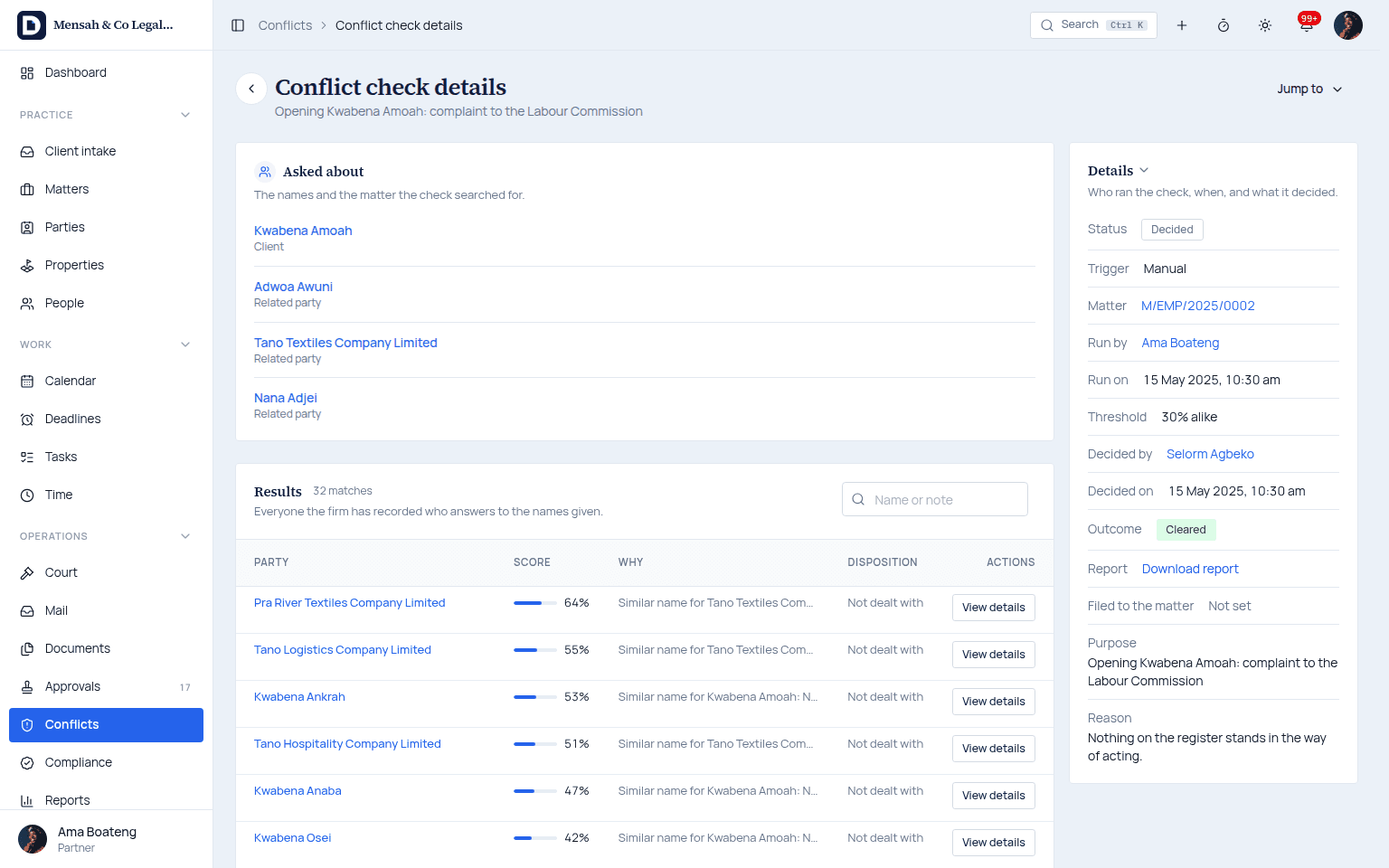
Opening Kwabena Amoah's complaint to the Labour Commission: 32 similar names scored, the check cleared, and the report kept with the matter. Matter overview
One screen carries the client, their standing, the engagement terms and the team, with every part of the matter a tab away.
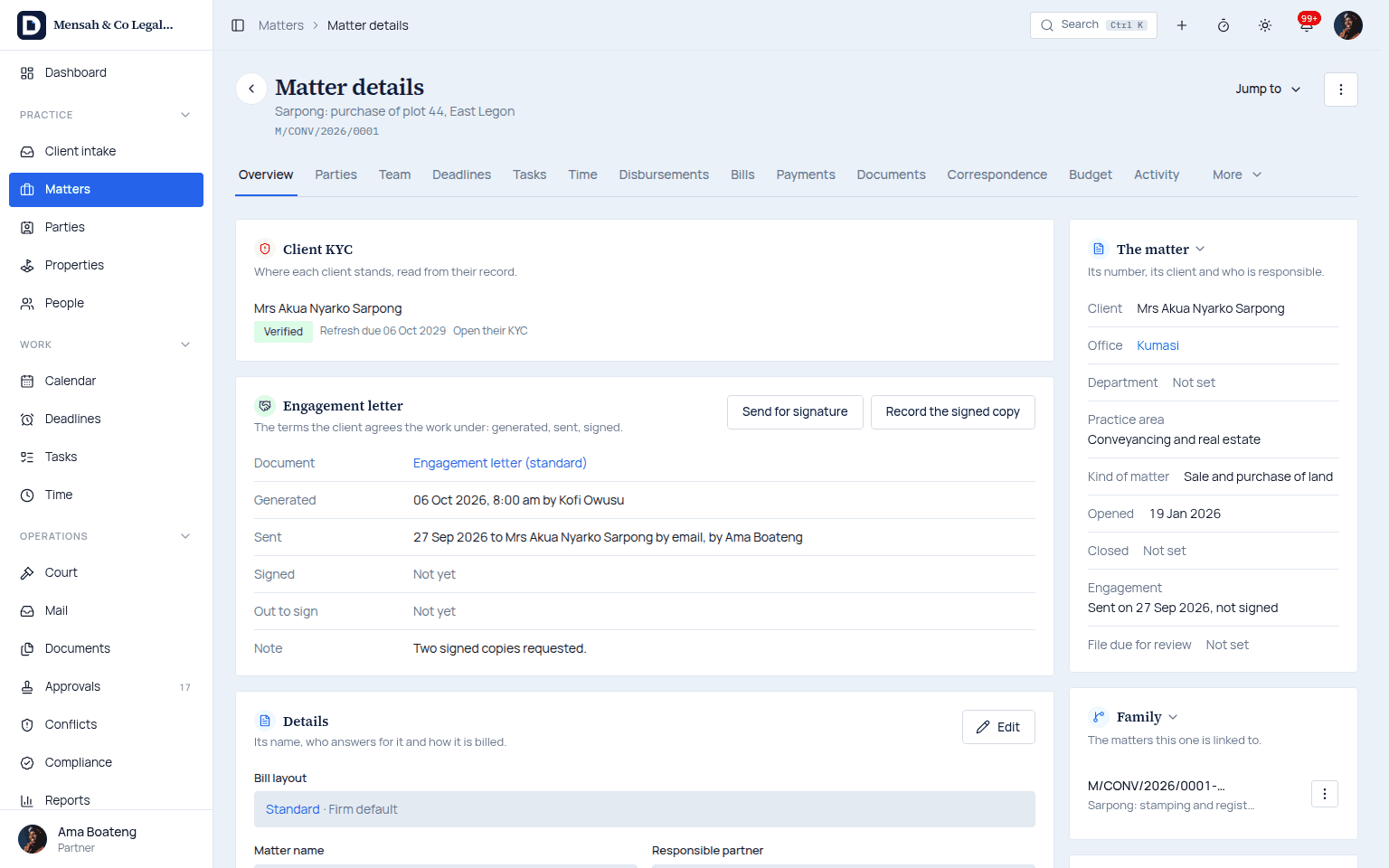
A land purchase in East Legon: the client's KYC verified, the engagement letter out to sign, and who answers for the matter. Documents and templates
The letters and agreements the firm drafts every week come from its own templates, filed against the matter with their versions kept.
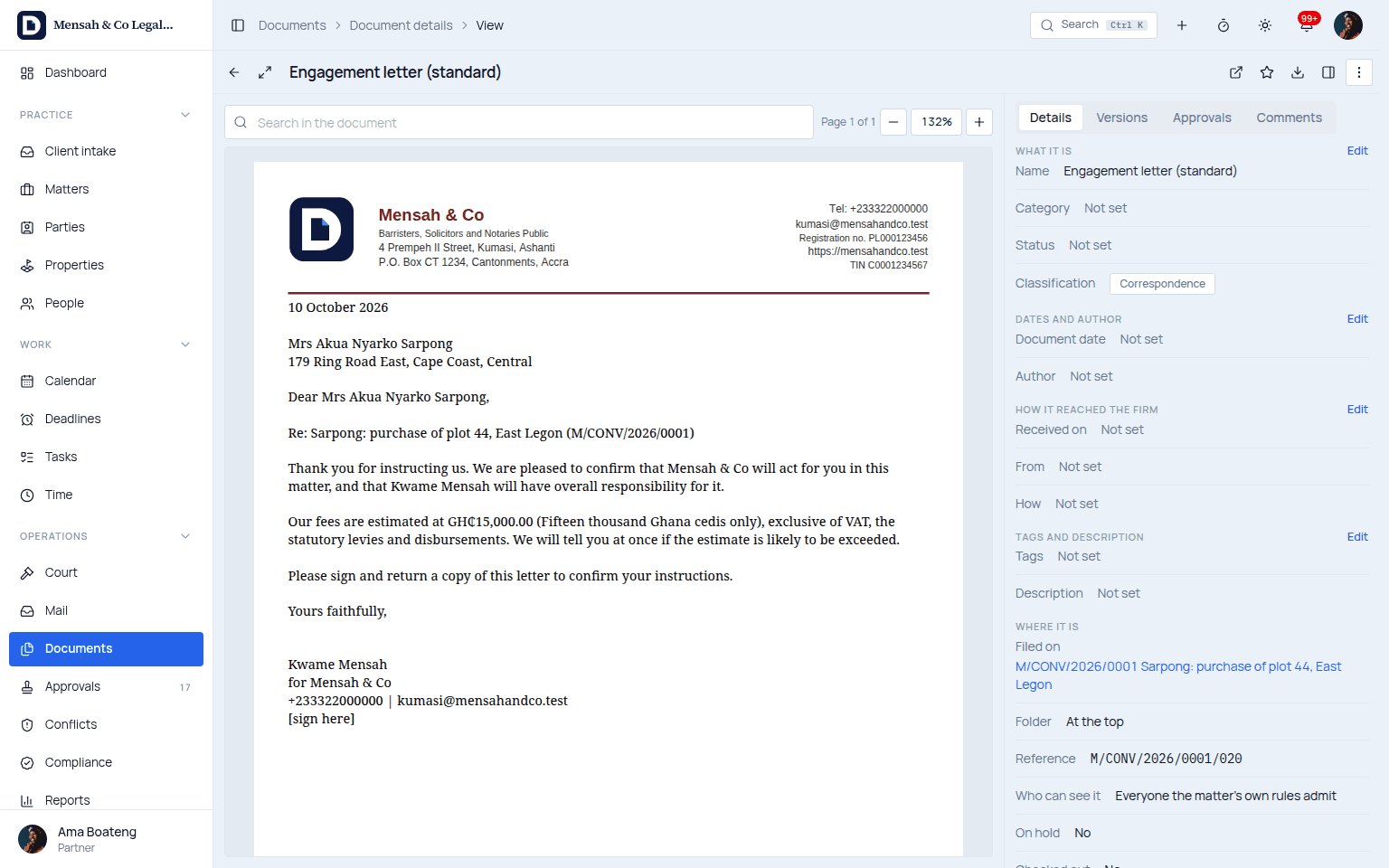
An engagement letter made from the firm's own template on its letterhead, the fee written in figures and in words. Court diary and deadlines
Hearings and filing deadlines are computed from the court rules, and a reminder that goes unanswered escalates to the responsible partner.
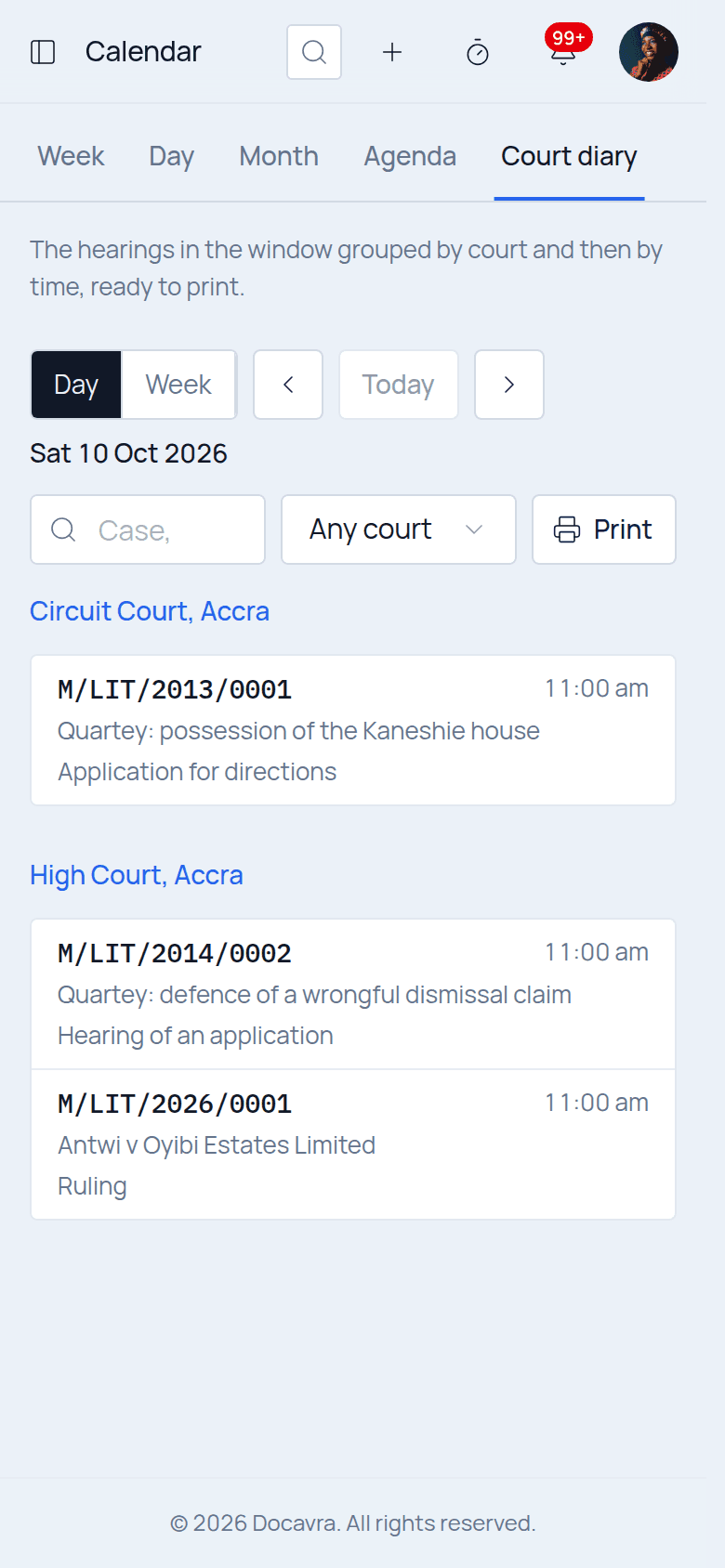
The day's hearings grouped by court, read on the phone in the corridor outside the courtroom. Time recording
A timer runs while the work happens, and the weekly grid catches the entries a fee earner made away from the keyboard.
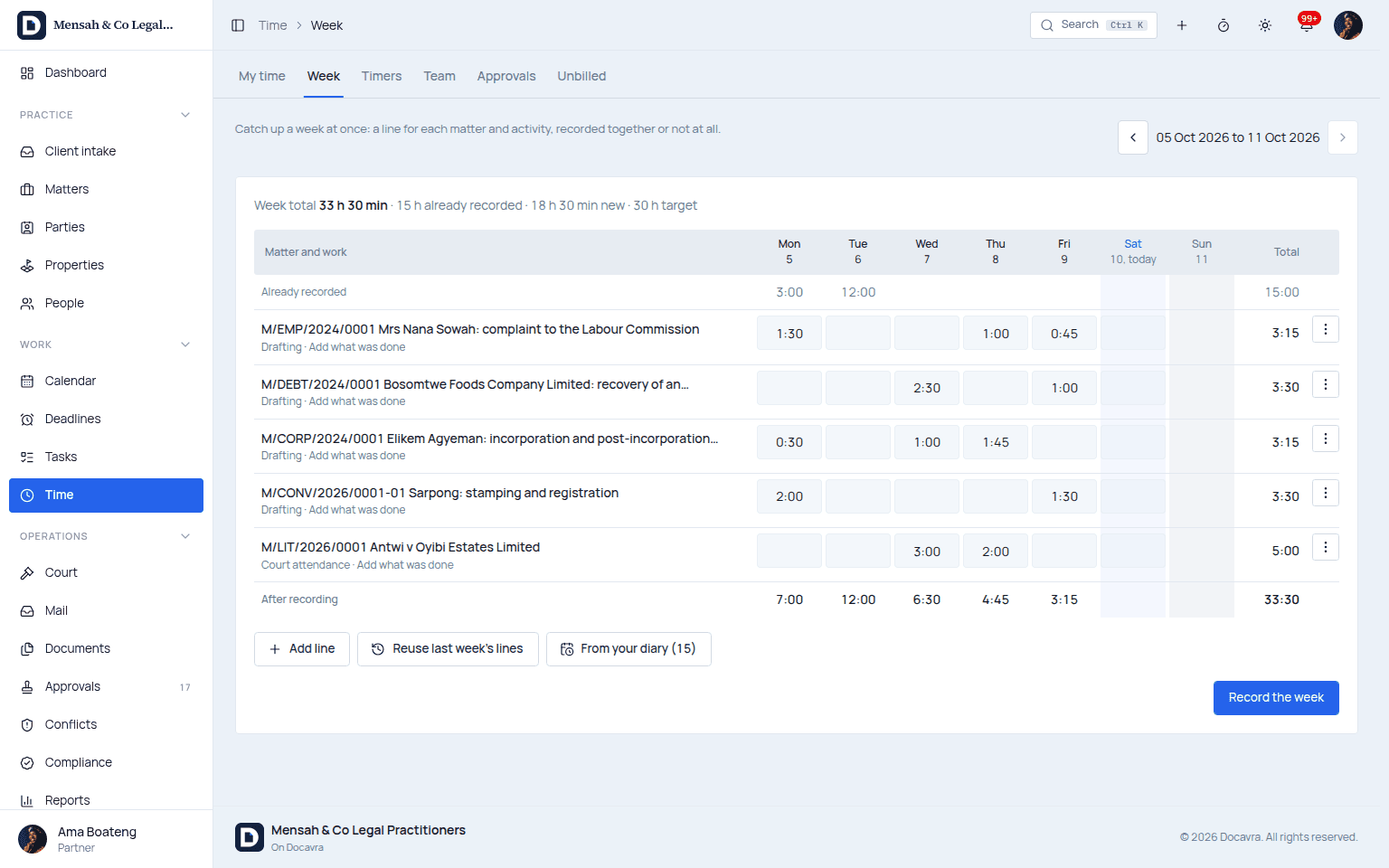
A week caught up at once: a line for each matter and activity, with the time already recorded counted in. Pre-bill and invoice
The partner reviews, writes off or moves every entry on the draft before an invoice leaves the firm.
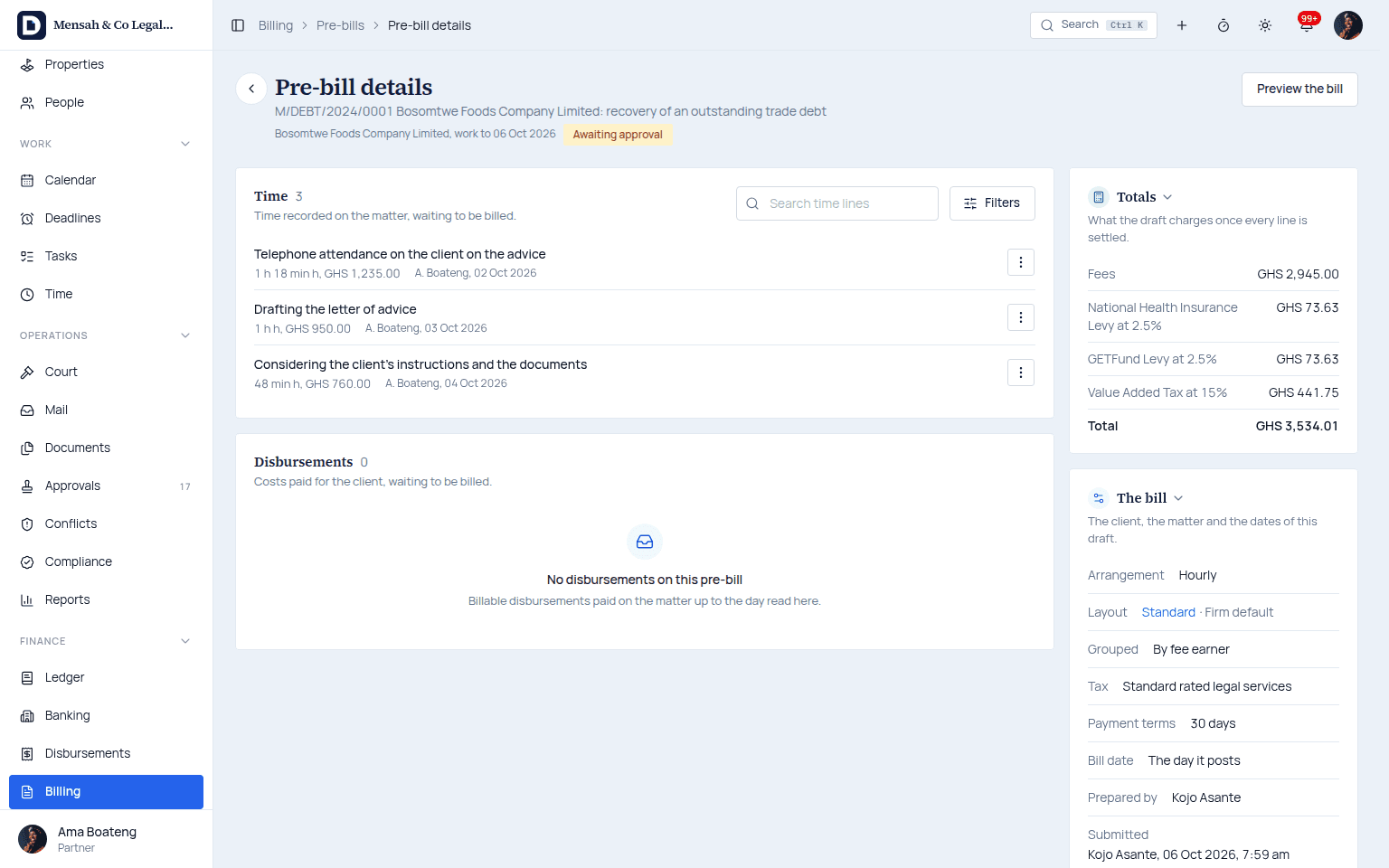
A draft awaiting the partner's approval, with VAT, NHIL and GETFund worked out on the fees before anything is sent. Client portal and online payment
Clients see their matters and invoices in a portal of their own and pay by mobile money or card, receipted straight to the ledger.
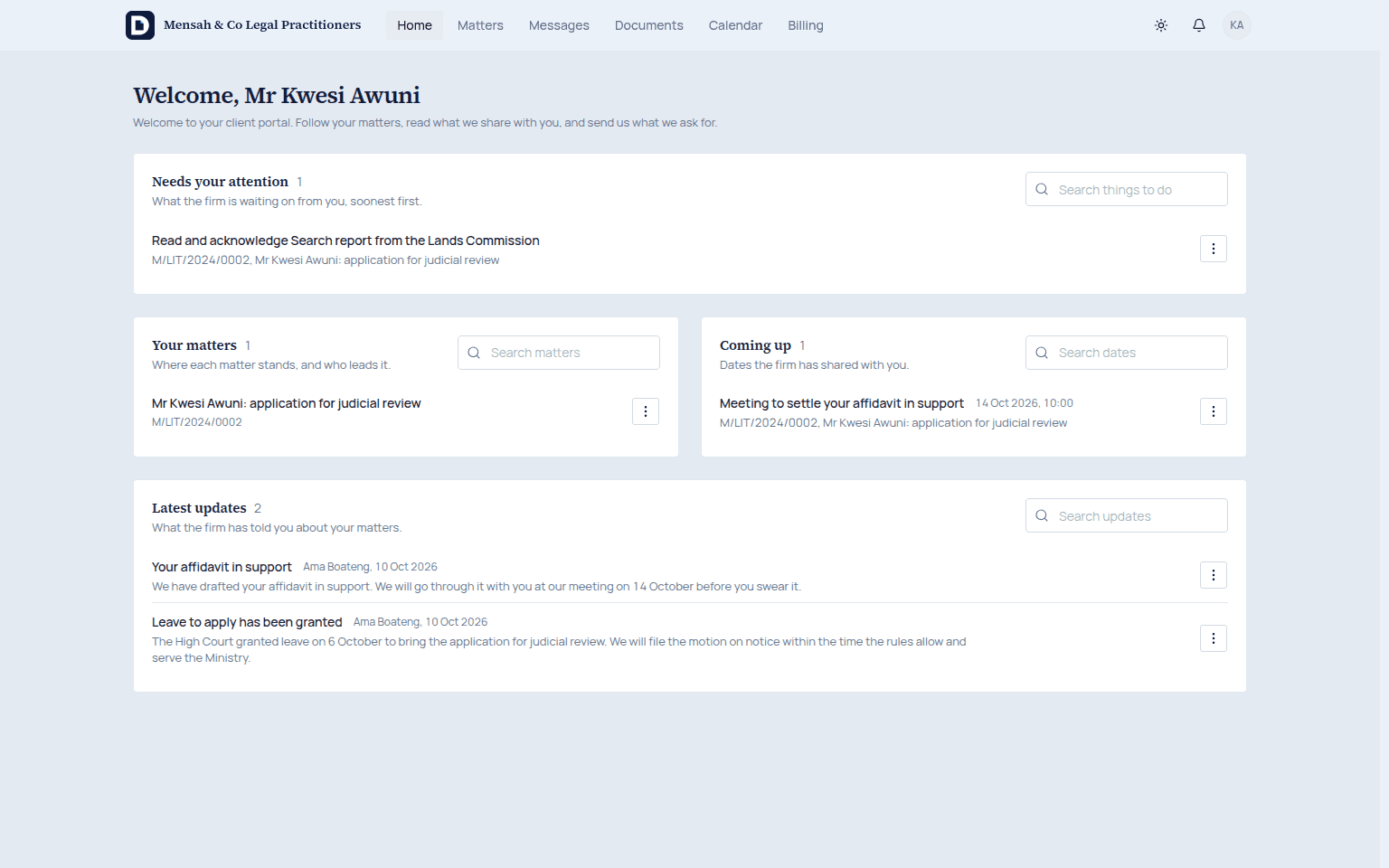
The client's own page: a report to read and acknowledge, the next meeting, and the latest word from their lawyer. Client account reconciliation
Client money is reconciled against the bank and every matter's ledger, so the answer to an auditor is a screen rather than a week of searching.
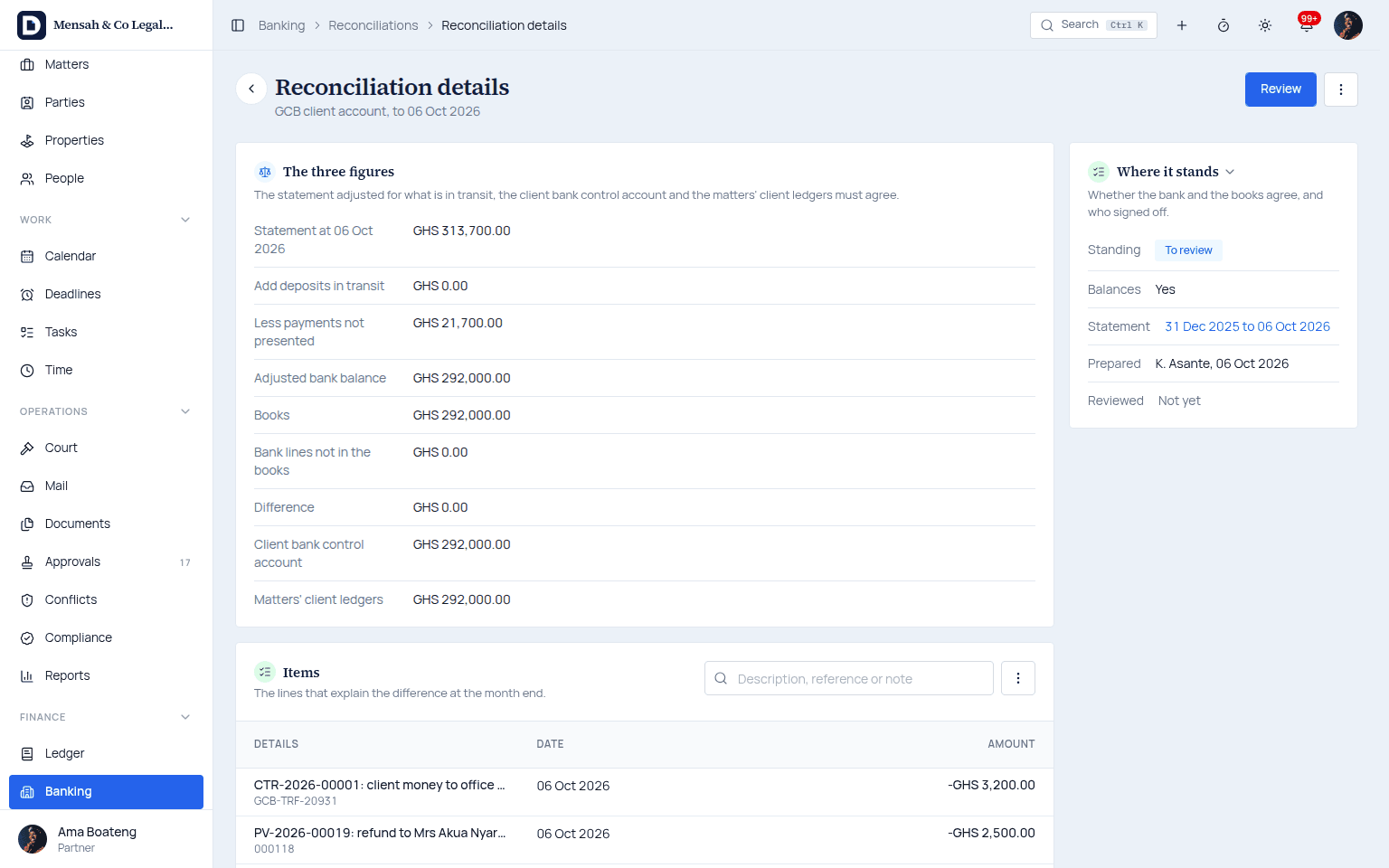
The client bank account, the client bank control account and the matters' ledgers agreeing at GHS 292,000.00.
And the rest of the practice
Tasks and workflows
Each matter type carries its own steps, so nothing waits on someone remembering.
Conveyancing and company secretarial
Lands Commission and ORC filings tracked as modules of their own.
Reporting
Work in progress, aged debtors and client balances, by partner and by matter.
Built here
It already knows what a Circuit Court is
Practice software written for another jurisdiction is excellent at its own courts and taxes, which are not the ones you appear before or file with.
The courts, already in the system
The hierarchy is seeded from the Supreme Court down to the District Court, with their registries.
Lands Commission conveyancing
A sale, a lease or a gift follows the steps the Lands Commission actually requires, from the search to the registered title. Company work with the Registrar of Companies is next.
Know your customer at intake
GhanaCard and business registration details are captured when the client is opened, not chased later.
Mobile money and cards
Clients pay through Paystack and Hubtel from the phone already in their hand.
Reminders by SMS
A hearing date reaches the client who never opens an email.
Invoices the Ghana Revenue Authority accepts
VAT, NHIL and GETFund are each charged on the correct base and shown the way the Authority expects.
Holidays and vacations in the arithmetic
Every deadline calculation counts Ghana public holidays and court vacations before it gives you a date.
Cedis throughout
Amounts are in Ghana cedis, and a matter kept in another currency is priced at the firm's own rate for the day.
Firms here have bought good software from abroad and then spent years working around the parts that assume a different country. This one starts from yours.
How it works
Try it, then subscribe. Your own database.
Try it free for 14 days, then subscribe monthly or yearly. The firm's data lives in a database of its own and stays the firm's.
- 01Try it14 days, free
A free trial in a database of the firm's own, with every part of the product open and no card asked for. Join the list and we write the day it opens.
- 02Choose a planMonthly or annual
A plan set by the number of people who sign in, paid monthly or yearly. The terms and the price are shown and accepted when the firm signs up, and the trial's work carries straight on.
- 03Learn as you goIncluded
Video tutorials for each kind of work, the help centre, and email support from a person, in every plan.
- 04Extra help, if you want itOptional, quoted
We can bring your matters, clients and balances across from the system or spreadsheet you use now, and train the team live. Both are paid services, quoted before anything starts.
Your own database
One firm's matters in one database, with nobody else's records in it, handed over whole whenever the firm asks.
A plan by firm size
Plans are set by how many people sign in. Clients using the portal never count, and every legal safeguard is in every plan.
Everything a practice needs
Conflicts, the court diary, time, billing and the client account in every plan, with no part of the law held back for a higher one.
Hosting, backups, updates, tutorials and email support are part of every plan. The full steps and what each plan carries are on their own page, and the plans and prices on the pricing page.
Who can see your files, and how you prove it
Privilege is the firm's obligation and Act 843 makes it a data controller, so the system is built to keep files from the wrong eyes and to show, afterwards, exactly who saw what.
Encrypted in transit and at rest
Nothing travels or sits on disk in the clear, including the database and the document store.
Documents behind signed links
Files live in private storage and are reached only through a link that expires minutes after it is issued.
Ethical walls that actually hide
A walled matter does not appear in a search, a list or a report for anyone outside it. There is no refusal to explain away.
An append only audit trail
Every view and every change is written down with who, what and when, and no one can edit the record afterwards. It is the record of processing the Data Protection Act, 2012 (Act 843) expects a data controller to keep.
Two step sign in for everyone
Any user can turn it on, by authenticator app or by a code sent to their email.
Backups that have been restored
Backups run continuously and a restore is rehearsed weekly, so recovery is something we have done rather than something we assume.
Solutions
For the firm you are
One lawyer or several offices, the same safeguards. Read Docavra by the size of your firm, or by the work you do.
Solo practice
One or two lawyers doing a whole firm's duties
Read moreSmall firm
Up to five people sharing one diary and one set of books
Read moreMid-sized firm
Several teams and practice areas, one standard
Read moreLarge firm
Offices, departments and access reviewed on a schedule
Read more
Questions partners ask in the demo
The ones that come up before the second screen. Anything else, bring it to the walkthrough.
Where does our data live?
In a database of the firm's own, never shared with another firm and never mixed into anyone else's records. We host it, back it up and keep the system current as part of the subscription, so there is no server for you to buy or look after.
Can we try it before we pay?
Yes. The free trial runs for 14 days in your firm's own database, with every part of the product open and no card asked for. It opens shortly; join the trial list and we will write the day it does. Until then, book a demo and we will walk you through it on matters like yours.
How is it priced, and what is included?
A subscription for the firm, paid monthly or yearly, with plans set by how many people sign in. Clients using the portal never count. Every plan carries every legal safeguard (conflicts, the client account, the court diary, the audit trail), hosting, backups, updates, video tutorials, the help centre and email support.
Can you bring our existing records across?
Yes, as a paid service. We map your spreadsheet or the export from the system you are leaving to matters, clients and balances with you, load a sample for you to check, then load the rest. It is quoted before anything starts, and you can also bring records in yourself with the import tools.
Is training included?
Video tutorials for each kind of work and the help centre come with every plan. Live training for the team, partners, associates, the accounts staff and the front desk each on the work they do, is a paid service you can add.
How is our data protected?
Every file is scanned before anyone opens it, access follows each person's role and the matter's team, ethical walls hide a matter from everyone outside it, and every change is kept in an audit trail no one can edit. We handle personal data under Ghana's Data Protection Act, 2012 (Act 843).
Does it use AI?
Not yet. AI features are coming, and our AI principles say how they will work: no training on your firm's data, limits on what is kept, your choice of provider, and a lawyer reviewing what the AI suggests. The provider agreements will be published before any AI feature is switched on.
Can we cancel and take our data?
Yes. You can export everything at any time. After cancelling, the firm has 90 days to read and export, then the data is deleted and we give you a certificate that it was. Your records are never held back for an unpaid bill: a firm is never locked out of its own records.
Does it work on a phone?
Yes, and not as a shrunken desktop screen. The views a lawyer needs standing in a corridor are built for the phone: today's diary, the matter in front of you, a note, and time recorded before you forget it.
How does the client account reconciliation work?
Every matter has its own client ledger, so you always know what belongs to whom. The system checks three things against each other: the sum of the matter ledgers, the client bank control account, and the bank statement. When they agree you have a statement you can hand to anyone; when they do not, it names the entry that broke it.
See it against your own matters
A 45 minute walkthrough using your own matters. No commitment, and nothing to install to watch it.